I worked on Moms Dell Inspiron 1000 today, the CPU fan had quit working. As long as I was tearing it apart to make the repair I installed a 2.5GHz Mobile Celeron processor, and used Arctic Silver 5 thermal paste.
The new fan kicked right in as expected, and there were no issues with the CPU upgrade either.
The Arctic Silver 5 states that it can lower the internal temp by as much as 52 degrees Fahrenheit, I believe it! I've changed out the factory thermal paste for AS5 on three of my machines, and I can see (Hear) the difference.
Another project coming this was as soon as the new CPU arrives, another Acer 5251 CPU upgrade, from a AMD V120 to a AMD P920, nearly a 400% improvement in performance, and it was only $80!
The fan replacement and upgrade was EASY! pull the button cover off, two screws that hold the keyboard, then the metal panel underneath. About 20 minutes into the whole process, not bad at all!
Later all!
"I CAN" Man!
*Update*
As it turns out, there was another underlying issue with the Dell. The video cable had a short in it that caused the computer screen to go dark, and force a restart. Once again, it was E-bay to the rescue! $4 later, and the laptop is running like a champ!
Pages
Working again!
I have a job again! another week till the drug tests come back, then I can start. Then I can get back to messing with computers!
The ZE5603WM has a 2.6GHz. processor that can be upgraded to 3.8GHz. if I can find one for a reasonable price.....still looking.
The Compaq SR5710F....I might be able to install a quad core in that one, just need to do some further research.
More to come soon!
Me!
(Unfortunately, this contract position only lasted 7 weeks! Time to look again!)
The ZE5603WM has a 2.6GHz. processor that can be upgraded to 3.8GHz. if I can find one for a reasonable price.....still looking.
The Compaq SR5710F....I might be able to install a quad core in that one, just need to do some further research.
More to come soon!
Me!
(Unfortunately, this contract position only lasted 7 weeks! Time to look again!)
Computer cleaning, thermal compund upgrade
The CPU fan on my older Acer 5100 seemed to be running at a higher speed for longer than normal recently. I decided to take it apart and clean it up. I had cleaned it once before when I installed the Tl-62 processor, so I figured as long as I am cleaning it, I might as well replace the CPU thermal compound with the Arctic Silver 5 that I bought for the Acer 5251. I decided to do a cleanup and compound install on my Compaq SR5710F as well, what the heck! Get 'em all done!
There was just enough buildup in the radiator fins to cause the CPU fan to run for longer periods of time. After cleaning it and the fan up, I removed and cleaned the CPU contact area and installed the AS5 and reassembled the Acer.
I ran the notebook for over an hour just to see if it made a difference, it did! The fan only idles now, much quieter! I may do the Compaq desktop next, I have replaced the processor there also, and used a generic thermal compound. I didn't think it would make a difference, I was wrong! I am hooked now!
This only goes to show, just because I think something, it does NOT mean it is indeed fact! I would not have thought it would make such a difference, it did!
Always learning!
Me!
There was just enough buildup in the radiator fins to cause the CPU fan to run for longer periods of time. After cleaning it and the fan up, I removed and cleaned the CPU contact area and installed the AS5 and reassembled the Acer.
I ran the notebook for over an hour just to see if it made a difference, it did! The fan only idles now, much quieter! I may do the Compaq desktop next, I have replaced the processor there also, and used a generic thermal compound. I didn't think it would make a difference, I was wrong! I am hooked now!
This only goes to show, just because I think something, it does NOT mean it is indeed fact! I would not have thought it would make such a difference, it did!
Always learning!
Me!
Acer 5251 finished
I received the AMD P920 Quad core Phenom II today and promptly installed it along with Arctic Silver 5. It took about 45 minutes to tear the notebook down, install the processor, and put the notebook back together.
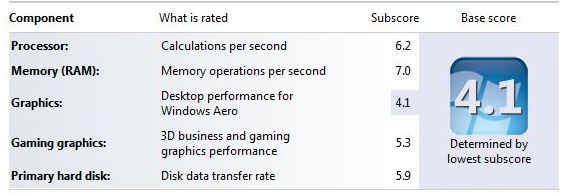
This thing runs far better than before, with no more heat than before. I optimized the drive, and re-scored the laptop, this is the new score with the system completed.
What it started out as:
For those of you who are going to say that these numbers really don't mean much, your right. I didn't base the replacement parts on the Windows rating, I based it on the Passmark scores they received, a much safer bet.
As for the Graphics score going up, this was due to a new driver from ATI that Acer has not yet put out. I happened to snag it up when I ran into an issue with the CL6 ram, all is well now.
Hard drive swap:
From a:
Hitachi HTS545025B9A300 (Passmark 478)
To a: Western Digital WD5000BEKT (Passmark 614)
Processor Swap:
From a AMD V120 (Passmark 653)
To a: AMD Phenom II P920 (Passmark 1960)**
**Arctic Silver 5 thermal compound used, it has been proved that it reduces temperatures, I can handle that!
Memory swap:
From: 2Gb Kingston 1066
To: 8Gb Crucial 1333
Video driver Update:
This driver is NOT on the Acer website, you will find it at the AMD/ATI website, look up your graphics card (Mobile) and you will find it. the ONLY time you will need this driver is if you upgrade to 8Gb of 1333 Ram. You will know right away, your resolution defaults to 1024x768, and you will lose your HDMI port.
Optimize the computer with:
CCleaner
Malware Antibites
Auslogics Disc De-frag
Auslogics Registry Cleaner
Spybot Search and Destroy
Ad-Aware
The BEST browser on the market (My opinion)
Firefox 4.0, it's even FASTER! (Don't let Google fool you, Chrome tracks you! That's how they give you just the "right" add experience, I'd rather have my anonymity! THANK YOU!
Later all!
Me!
This thing runs far better than before, with no more heat than before. I optimized the drive, and re-scored the laptop, this is the new score with the system completed.
What it started out as:
***The Memory started at 5.5, the 5.9 is after an upgrade to 4Gb of memory.***
For those of you who are going to say that these numbers really don't mean much, your right. I didn't base the replacement parts on the Windows rating, I based it on the Passmark scores they received, a much safer bet.
As for the Graphics score going up, this was due to a new driver from ATI that Acer has not yet put out. I happened to snag it up when I ran into an issue with the CL6 ram, all is well now.
Hard drive swap:
From a:
Hitachi HTS545025B9A300 (Passmark 478)
To a: Western Digital WD5000BEKT (Passmark 614)
Processor Swap:
From a AMD V120 (Passmark 653)
To a: AMD Phenom II P920 (Passmark 1960)**
**Arctic Silver 5 thermal compound used, it has been proved that it reduces temperatures, I can handle that!
Memory swap:
From: 2Gb Kingston 1066
To: 8Gb Crucial 1333
Video driver Update:
This driver is NOT on the Acer website, you will find it at the AMD/ATI website, look up your graphics card (Mobile) and you will find it. the ONLY time you will need this driver is if you upgrade to 8Gb of 1333 Ram. You will know right away, your resolution defaults to 1024x768, and you will lose your HDMI port.
Optimize the computer with:
CCleaner
Malware Antibites
Auslogics Disc De-frag
Auslogics Registry Cleaner
Spybot Search and Destroy
Ad-Aware
The BEST browser on the market (My opinion)
Firefox 4.0, it's even FASTER! (Don't let Google fool you, Chrome tracks you! That's how they give you just the "right" add experience, I'd rather have my anonymity! THANK YOU!
Later all!
Me!
Acer Aspire 5251-1513 CPU Upgrade update
So far I have found that these processors will work in my computer. Most are 25w, although the MB can handle 35w safely according to the Acer website.
The processors highlighted are the one's I'm shooting for, I can see as much as a 351% performance improvement (Not quite accurate, but close)
Only time will tell now, the prices of the better processors are still high, I might have to wait for what I want?
The processors highlighted are the one's I'm shooting for, I can see as much as a 351% performance improvement (Not quite accurate, but close)
Only time will tell now, the prices of the better processors are still high, I might have to wait for what I want?
CPU Model Passmark Score ID Number
AMD V Series (25W)
V120 658 VMV120SGR12GM
V140 696 VMV140SGR12GM
AMD Athlon II Dual Core Mobile (25W)
P320 1270 AMP320SGR22GM
P340 1298 AMP340SGR22GM
AMD Turion II Dual Core Mobile (25W)
P520 1437 TMP520SGR23GM
P540 1504 TMP540SGR23GM
P560 1667 TMP560SGR23GM
AMD Turion II Ultra Dual-Core Mobile M6 (35W)
M600 1502 TMM600DBO23GQ
M620 1526 TMM600DBO23GQ
M640 1631 TMM600DBO23GQ
M660 1653 TMM600DBO23GQ
AMD Phenom II Dual Core Mobile (25W)
P650 1733 HMP960SGR23GM
AMD Phenom Triple Core Mobile (25W)
P820 1671 HMP820SGR32GM
P840 1824 HMP840SGR32GM
P860 1876 HMP860SGR32GM
AMD Phenom Triple Core Mobile (35W)
N830 1961 HMN830DCR32GM
N850 2074 HMN850DCR32GM
N870 No score yet HMN870DCR32GM
AMD Phenom Quad Core Mobile (25W)
P920 1957 HMP920SGR42GM
P940 2199 HMP940SGR42GM
P960 2315 HMP960SGR42GM
So far it has been interesting finding compatible processors, just when I think I have them all, I find another two or three.
Hope this helps
Me!
Acer Aspire 5251-1513 HD Upgrade
The upgrade this time is the hard drive:Going from a:
Hitachi 250GB SATA 5400rpm, HTS545025B9A300, 8Mb Cache, 3GbS
To a:
Hard Drive:
Western Digital 500Gb SATA, 7,200Rpm, WD5000BEKT, 16Mb Cache, 300, 3Gbs.
While the maximum transfer rates are the same, the WD will perform much better than the Hitachi does.
Western Digital made the cloning process a snap with the use of the Acronis True Image software that is available for free at the WD website.
Cloning the drive was as easy as installing the software, attaching the new drive with an external enclosure and then running the software.

When Acronis is done running, you just swap out the drives, and you are DONE!
This was a VERY easy swap, program and all. It is up and running with no issues.
You can do this one easily!
Later all!
Me!
Linux on a laptop

So I was bored the other day and wondered what it would be like to run linux on a laptop? It was a tossup between Open SUSE and Fedora. Fedora was the winner (The Open SUSE disc was bad)
I have to admit, Fedora was an easy install? All of the components of the computer were recognized right away! and it connected wirelessly instantly!
Figurung out how to install
applications was something else! I know that all installations use "yum" but no one was explaining how to get to "yum". I figured it had to to with the Linux version of a command line, but again, no explanations on line?
The installation of applications is completely different than it is in Windows, not at all alike! But it is easier! And most all of the applications are free! I'll post more when I get to messing around with it. So many things to learn yet!
Later all!
Subscribe to:
Posts (Atom)